
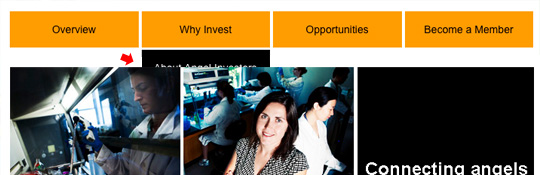
Superfish dropdown menu appears behind slideshow, image etc. in IE7
This is a problem that I found when I was using a superfish drop-down menu with Drupal 7 and Omega, but it is a solution that would work across the board for anybody using a drop-down menu. The primary menu using Drupal is usually in the header-wrapper div (zones-above in Omage) and content is in the main-wrapper div (zones-content in Omage). If you are not using Drupal you probably still have the menu wrapped in the header. So, in your ie7.css, set the header wrapper to have a z-index of 2, and set no z-index on main-wrapper (which means its 1). Now all content in header-wrapper will appear above main-wrapper, no matter if something has z-index:10000000 somewhere in main-wrapper. NOTE: This is only in IE7, and possibly below, but who cares about IE6 anymore. IE8 has thankfully fixed this problem
#header-wrapper {
position:relative;
z-index:2;
}
#main-wrapper {
position:relative;
}
Nice and simple, hope this helps. Leave a comment if you’ve found this useful.


About Author

I'm the curator here at designshifts.com as well as being a web developer by day. I have a passion for design and love to share inspiration and tips and tricks with the community.
Thanks, I was looking for a quick fix, and my brain was on empty. I had to just change #header-wrapper to #section-header, and it worked.
OMG! You are life saver! I’ve been battling with this for some time now. I tried a similar solution to yours, but I had set the main z-index and never touched the positioning, which didn’t work.
THNKS!
No problem,
Glad it helped.
Thanks, nice to find a solution so easy that works.
How I love burning the midnight oil for ie7 in 2012. Thanks for saving me some time and some hair. Bingo!
Thanks for the tip. I have a question.
I am using omega and cant find ie7.css file. Am I suppose to install any other module to get this work? Please suggest
Typically you would have a css folder in your theme. Create the new ie7.css file and add it to the css folder. then open your omega themes (themename).info file and add the link to the new css file:
; ——- Declare default stylesheets
stylesheets[all][] = css/subtheme.css
stylesheets[all][] = css/ie7.css
Hope that helps.
Nice post, it works for me now.
Thanks you saved me lot of time.
FANTASTIC!!! So simple and so efficient.
Thanks!
No problem! Cheers Maricel